Showing posts with label blogging. Show all posts

Friday, January 27, 2017

Using Weebly Blogs as "Cloud Storage"

This year my school has 2 computer labs that the elementary classes can access, when they are not being used for testing. I also have 6 computers in my own classroom that students use regularly, so we have quite a bit of access to technology. However, we don't have any school specific "cloud storage." So, at the beginning of the year, my students would begin typing a story in my room and then we would go to the computer lab and they wouldn't be able to get to their story. My school alsodoesn't allow flash drives because some students were accidentally bringing viruses to school with them. So I had to think up a quick way to have "cloud storage" for my students. 


Use weebly to create cloud storage in the classroom - ideas from Raki's Rad Resources

I decided to have my students type their writing on their very own Weebly blogs. This way the students could work on their writing anywhere that they had access to the internet. We generally type in the computer lab, but my fast finishers can use those extra 5 minutes to type on the computers in my room. My slower typers can continue typing while we move into another activity, or even take the typing home for additional practice. It's been a life saver this year, and on top of that the kids have created nifty little "writing portfolios" where they can see their own writing progress and share that progress with their family and friends.

Creating Weebly blogs is quite simple. As a teacher you can create up to 30 blogs for free on your account. Then the students can access them with their own individual usernames and passwords. The students have the ability to individualize their blogs and to create many different kinds of posts, including those with picture slideshows, hyperlinks and embeded text. This year on their blogs my 3rd graders have:

 - published realistic fiction stories

 - published narrative stories about a time they were brave

 - published informational articles about animals where they added pictures with captions

 - completed a 2 day "quick write essay" about a book we read in class

Next week the students are publishing their completed storybirds by ebedding the HTML code directly into a blog post. While this may sound complicated, Weebly is set up on a very intuitive drag and drop system that the students pick up on very quickly. In fact, the students often figure out additional things they can do with their blogs that I didn't even know was possible. This is generally because kids are more open minded than adults, and because they have more time to fiddle around with things.

So if you're looking for an easy and free "cloud storage" or a way to make student blogs, Weebly is the place to be.

*** I am not in anyway affiliated with Weebly, these are own observations based on really using this website with my own class.


Monday, January 12, 2015

Where to Find Your Own Professional Development as a Teacher

DIY Professional Development - How teacher blogs, twitter chats, you tube videos, pinterest boards and education podcasts can help you guide your own professional development.  Advice and suggestions from Raki's Rad Resources.

Teachers often sit through a lot of professional development that unfortunately does not pertain to them because although we ask teachers to differentiate for each child, we rarely differentiate professional development for each teacher.  Fortunately, thanks to technology, there is an amazing amount of professional development available out there that will meet your specific needs as a teacher.  You just need to find it.  Here are some places to find just what you need to make you an even better teacher than you already are.

 DIY Professional Development - How reading different teacher blogs can help you guide your own professional development.  Advice and suggestions from Raki's Rad Resources.

Teacher Blogs – There are teacher bloggers out there for every grade level and every subject.  These bloggers share about what they do (or did) in their classrooms, the resources they use, the methods they learn and the activities they are planning.  Each blogger share a bit of their personal expertise.  Here at Raki’s Rad Resources, I share tips for working with ESL students, websites and apps to use in your classroom and information about some current trends and theories in education. I also sometimes share what I do with my own homeschooled children.  When I was in the classroom, I shared tons of what I did with my students and these posts can still be found here at Raki’s Rad Resources.  Of course, my blog is far from unique.  Here are some other amazing teacher blogs you should check out:

Corkboard Connections

Minds in Bloom

Free Technology for Teachers

ScienceFix

TheJoseVilson.com

 DIY Professional Development - How listening to education podcasts can help you guide your own professional development.  Advice and suggestions from Raki's Rad Resources.

Podcasts – Podcasts are basically online radio shows.  Similar to the way blogs have taken over as sources of news, podcasts take an individualized “niche” approach to the radio show.  Podcasts can be listened to using the Podcast app on an iPhone or iPad and with any variety of free apps on an android device including PodKast and Doube Pod Podcast.  Many podcast authors will also post the podcasts as .mp4 files on their personal websites so that you can listen to them on your computer.  Personally, I listen to podcasts on my phone – through attached speakers – while I cook dinner.  Many people prefer to listen to podcasts during their commutes or as they are prepping next week’s centers or any other time when their hands are busy, but their brains may not necessarily be very busy.  While I don’t have a podcast of my own at this moment, I have a few ideas bouncing around in my head, so this is on the to-do list, but it’ll be awhile before I get there.  In the meantime, here are some awesome teacher podcasts to check out:

Truth for Teachers

Cult of Pedagogy

Technology Matters

Math Dude

The Teacher’s Podcast

DIY Professional Development - How participating in twitter chats can help you guide your own professional development.  Advice and suggestions from Raki's Rad Resources.

Twitter Chats – Real time, live conversations about real, important topics in the field of education today are happening on twitter through twitter chats.  This is what twitter chats are.  Each twitter chat has an assigned day and time – usually once a week for an hour.  The most common times for chats are between 6 and 9 p.m. EST on any school night, but there are actually twitter chats almost 24 hours a day, depending on location.  To participate in a twitter chat, you have to know the hashtag of the twitter chat you want to be involved in. At the designated time, you log into twitter, introduce yourself with the hashtag of the twitter chat and answer the questions put out there by the moderator.  Additionally, you can comment on, retweet and like the answers of the other people participating in the chats.  Beyond being an amazing, quick moving and inspiring, twitter chats give you a chance to meet like minded individuals and follow them on twitter.  (You can find me on twitter @hlraki, btw.) Here are some great twitter chats where you might find me:

#teacherfriends

#teachedchat

#ellchat

#byotchat 

#edtech

 DIY Professional Development - How exploring pinterest boards can help you guide your own professional development.  Advice and suggestions from Raki's Rad Resources.

Pinterest Boards – Besides being a place to gather visual hyperlinks, Pinterest is a place to gather information and organize it.  It’s also a place to check out what everybody else has been checking out.  Personally, I have boards for each standard elementary subject (Math, Reading, Writing, Grammar, Science, Social Studies) and for Technology in the Classroom and iPads in the Classroom.  To these boards I post my own blog posts on these subjects, but also great blog posts written by others, pictures of amazing things I want to try later, websites I want to share with my boys, etc. etc.  Some other great Pinterest boards to check out are:

All Things Technology

A+ Teaching Ideas

**Educational Blogs and Blog Posts**

Classroom Organization

Bulletin Boards

 DIY Professional Development - How watching educational you tube videos can help you guide your own professional development.  Advice and suggestions from Raki's Rad Resources.

YouTube Channels – When I started flipping my classroom two years ago, I scoured YouTube looking for the perfect Math videos to use with my kids.  What I discovered is that many, many teachers and education companies (like TEDed) have their own YouTube channels with amazing videos that teach pretty much anything.  There are amazing ones to help you brush up on your background knowledge – like Crash Course.  There are also amazing YouTube channels to help you learn anything you want to learn about pedagogy, teaching techniques and current trends in education.  I have a very small YouTube channel, which you can access HERE.  I am working on building this channel and am hoping to start a new set of teaching videos SOON!  Some other great YouTube Channels to check out are:

Ted Talks

The RSA

Teaching Tolerance

Chris Biffle (Whole Brain Teaching)

SimpleK12

No matter your preferred modality (words, pictures, audio files, videos) or your current needs, there are tons of resources available to help you build yourself up as a teacher.  We teach our students to be independent learners, but how often do we go out and find the information we need without prompting from above?  (Well, actually if you’re here on my blog reading this, you’re probably part of the percentage who does!)  Take some time to explore these sites and develop your own Professional Development that is geared specifically at your needs.  Also, please feel free to pass these resources onto your colleagues and other teacher friends who might benefit from these resources.

Heidi Raki of Raki's Rad Resources

Thursday, July 31, 2014

Technology Accounts to Create for your Students at the Beginning of the School Year

You’ve picked out the perfect technology project for your students.  You’ve given them a planning sheet with all the steps, and you’ve even given them an advance copy of the rubric so that they know what you are looking for.  Everyone lines up and you set off for the computer lab OR you start your center rotation and they are working at computers in your room.  The kids get on the computer and ask you – What’s my username and password?  That’s when it hits you – you forgot to set up their accounts!!!!  Oh the horror of wasted technology time due to missing usernames and passwords!  The solution?  Take time NOW to create accounts (or have students create accounts) for programs you think you will use during the school year.

  Technology accounts to set up for students at the beginning of the school year.  Setting up accounts at the beginning of the year makes the rest of the year's technology go much smoother.

Setting up student accounts ahead of time gives you and your students some distinct advantages:

1.)  You’re ready for all kinds of projects – planned and unplanned (you know those great teachable moments!)

2.)  The kids can play with the programs outside of school, or when they have finished their work, allowing them to figure out the programs BEFORE they have a big project due with this program.

3.)  Students can show their parents the types of programs they will be using – helping parents to see that the technology they will use will not just be playing games, but will be using technology for educational purposes.

4.)  When assigning a project, you can give students a choice of ways to present their work, empowering students to take control of their own learning.  I started this with my Virtual Field Trip Project last year and the results were amazing!


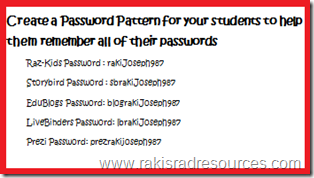
Create a password patter for your students to help them remember all of their passwords - how to help elementary words organize their passwordsConsider letting students create their own accounts, as long as they report their passwords to you.

1.)  Demonstrate HOW to create an account before you ask students to create their own account.

2.)  Have students use a password pattern so that they don’t forget their password.  Find more details on this at my blog post about 10 Tips to Make Technology Integration Easier.

3.)  Keep a record of each students’ usernames and passwords, in case students forget them or you need to get into their account for any reason. 


So, what accounts should you have set up in the beginning of the year?

Click on the names of each website to see how this program has worked in my classroom.

1.) Edmodo

2.) Storybird

3.) A Blogging Site, like Edublogs

4.)  Prezi

5.)  Powtoon

6.)  LiveBinders


Heidi Raki of Raki's Rad Resources