Showing posts with label flipping the classroom. Show all posts

Friday, December 12, 2014

Let the Students Teach the Vocabulary Lesson

Teaching kids vocabulary is a critically important skill.  If you understand the vocabulary of any given subject, you will better be able to understand articles or textbook pages on the subject, lessons taught by the teacher, videos watched online and even the tests given on that subject.  There are tons of ways to practice vocabulary – practicing flash cards, playing games, writing sentences, etc.  However, we need to stop and ask ourselves, how much of this vocabulary do we want our students to remember?  In order to truly remember vocabulary words, students have to be doing more than reading the words, copying the definitions, or writing sentences with them.  True, a combination of these different activities will help memory.  This is the reasoning behind my ESL Vocabulary Packets and my Spelling Patterns Vocabulary Packets, giving students the ability to work with words in at least 5 different ways.

However, for key vocabulary words, especially in a content area like Math or Science, the best way for students to truly remember important vocabulary words is to create with them.  Students who create lessons, videos or games with their vocabulary words cement those words and their meanings into their memories because they have had to think about them to such an extent that their brain has carved out a special neurological path for them. 
vocab game

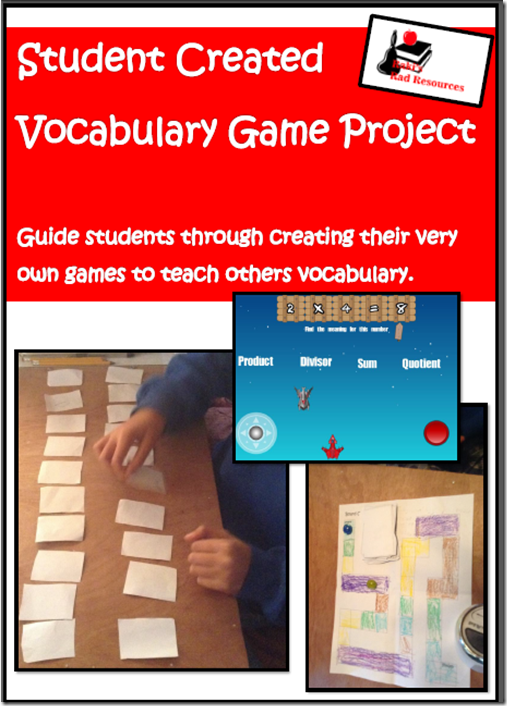
My sons created vocabulary games this trimester for key Math words.  My second grader created board games and memory games using the pieces in my Vocabulary Game project.  My 5th grader, however, got fancy and used an iPad app called GamePress to create three short video games with key vocabulary words in each of his languages.  Each of the kids tried out their games with each other, and with some friends who came over.  This gave them a chance to be the teacher, the expert and the one cementing these words into their memory.

Since my sons are learning Math in three languages – English, French and Arabic – vocabulary is especially important for them to understand what questions are asking of them.  The same can be said of our ESL population in public schools in the US.  Without these key words, students loose meaning in problem solving, on tests and in general lessons.

What vocabulary words could your students benefit from teaching others?

Heidi Raki of Raki's Rad Resources

Monday, August 25, 2014

Math Mini Lesson – Why Do We Learn Math?

Math Mini Lesson #1 - Why do we learn math?  A flipped classroom video by Heidi Raki of Raki's Rad ResourcesFor the past two years, I have used the flipped classroom approach to teaching Math.  (For more specific details on this, check out my blog post – My Flipped Classroom)  During the course of these two years, I spent A LOT of time scrounging through YouTube and other sites looking for the PERFECT video to cover what I needed to cover.  Of course, I rarely found the perfect video, so I used ones that were close and compiled quite a list, which you can find in the post Using Google Docs to Aid in Collaboration.  I never made my own videos for one simple reason – time, as a classroom teacher you NEVER have enough time.

Since I do not have a classroom to prepare for this year, I have a bit more time on my hands.  So, I decided to go ahead and record those mini lesson videos that I needed last year and share them with you guys on my YouTube page.  The videos are created to be used with my Interactive Notebook pages, which will linked in the video descriptions, but can honestly be used by anyone in a flipped classroom, blended classroom, homeschool environment or just to save you from having to prepare a mini lesson.  :)

This week’s mini lesson is on the age old question:  Why do we learn math?

Feel free to use this lesson in your classroom or share it with your teammates.  I will be posting new videos to my YouTube page regularly and will feature one video a week here on the blog.

Are you flipping any part of your instruction this year?  If so, please leave me a comment telling me what grade level and subject!

Heidi Raki of Raki's Rad Resources

Monday, April 14, 2014

Why Aren’t Students Teaching the Lesson?

We remember 10% of what we read, 20% of what we hear, 30% of what we see, 40% of what we see and hear, 70% of what we discuss, 80% of what we experience, and 95% of what we teach.  Give students time to be the teacher - Raki's Rad Resources

I’ve seen this list go around for a long time.  When I think of my personal learning experiences, it makes sense.  When I am preparing to teach a lesson, I do far more research than if I am finding information for myself, because I want to be ready for unexpected questions.  In addition, as I am explaining things and making those connections for my students, I often feel myself connect what I am explaining to other things I know.  Unfortunately, my students don’t have identical background knowledge to me, so they are not making the same connections.  They won’t remember the lesson as well as I will.  Kind of stinks, since they are the intended audience, huh?

But, maybe we are thinking about this wrong.  Maybe students should be participating in our lessons, reading books, watching videos and having discussions, in order to gather information so that they will be ready to teach the class.  Then, they can make connections with their own background knowledge and cement the understanding into their own memories.

Students can “teach the class” in many ways.

1.  You can set aside real class time for them to take over class and be the teacher.

We remember 10% of what we read, 20% of what we hear, 30% of what we see, 40% of what we see and hear, 70% of what we discuss, 80% of what we experience, and 95% of what we teach.  Give students time to be the teacher - Raki's Rad Resources 2.  They can create tutorial videos for their classmates.  My students publish theirs on YouTube to help out students around the world.  We use these sheets to help us plan our lessons.

3.  They can create “guide books” with words and illustrations on how to solve the problem or understand the concept.

4.  You can have a “peer tutoring” day where students take turns answering each other’s questions on a topic.

5.  They can create photo stories or blog posts to walk others through how to solve a problem or understand the concept.


If we make students the teachers, we don’t lose our role.  We still need to help students build their knowledge by creating engaging, experiential lessons; by leading engaging discussions; by suggesting ways to find answers to their questions; by guiding them through the process of developing their lesson or teaching materials.  If we make students the teachers, we give our students the chance to remember 95% of what they have been exposed to.


Heidi Raki of Raki's Rad Resources

Sunday, August 4, 2013

Have you Flipped Your Classroom?

Taking PD into your own hands - Professional Development Sunday at Raki's Rad Resources Recently, I posted about how my school is using Facebook and Pinterest as part of our professional development.  (See the whole post HERE.) I’ve decided to pass on some of the best videos and articles I come across to you each Sunday evening.  Here is this week’s professional development post:

 Can tutorial videos change the future of education?  Professional Development Sundays at Raki's Rad Resources

 This year, I “discovered” the flipped classroom concept and fell in love with the Khan Academy.  (See how I flipped my math classroom HERE.)  This week’s video is by the creator of Khan Academy, Salman Khan who developed Khan Academy on accident when he was tutoring his cousins long distance.  What I love most about this video isn’t even the videos at Khan Academy – although I do love those!  My favorite part is the inspiration to have students not only be receiving videos but also creating videos and collaborating with their peers to create a global classroom.  Have you tried flipping your classroom?


If you’re interested in more professional development videos – follow my Professional Development Pinterest board.

Heidi Raki of Raki's Rad Resources

Thursday, April 25, 2013

My Flipped Classroom

At the ECIS Technology conference, I attended a workshop on the flipped classroom and was fully intrigued.  The presenter, Heather Martin, teaches Middle School English.  She creates grammar and writing videos for her students and posts them on her You Tube Channel.  Her kids watch a video for homework and respond on a Google Document.  Then, in class, they work on application activities involved in writing, editing, revising etc.  Here is one of her videos:

Mrs. Martin isn’t the first teacher to use a flipped classroom model.  The first flipped classrooms began to show up in the 1990’s and now are showing up all over the world.  In a flipped classroom, all or some of the homework is a video or online simulation that “teaches” what you would normally teach in class.  Then, in class the kids focus on activities, projects and practice problems that would generally be homework.  This way, there is nobody sitting at home stuck on how to figure out a math problem, or even worse practicing doing it wrong. 

After the conference, I decided to adopt a flipped classroom method for my math block.  Two days a week, my students have “video homework”.  I don’t have time to make all of my own videos (although I have a few particular videos I’m planning to make over the summer).  However, there are SO  many videos already available, that I have found what I need for the rest of this school year.  The majority of the videos my students are watching have come from the Khan Academy, which is an online library of over 3,000 videos on tons and tons of subjects.  Other good sources of online videos include: Knowmia, Engvid, Teacher Tube, EDTed, NeoK12, and Math Playground.

image

All of my students’ homework is done through Edmodo.  So, on the days that my students have video homework (Friday and Tuesday), I post the video link into an Edmodo post and ask for them to watch it and then respond with a good quality sentence or two about what they learned.  Then, the next day in class, (Mondays and Wednesdays)we work on text book pages that would “normally” have been assigned for homework.  While they are working on these pages, I am right there to solve problems and answer questions.  I can spot right away if there are things that need to be better explained, or when they need a hands on example and I either pull them right then for a quick impromptu mini lesson or I plan one for the next day. Whatever students do not finish in class that day becomes their homework on those days.  image

On the days where my students haven’t had a video homework assignment the night before, my students work on their Problem Solving Paths, or Math Projects – like the Balanced Checkbook project we just finished.  Again, I am right there to help guide them.  This is the time of the week where I plan specific mini lessons on things that videos won’t cover or on topics that I have seen the kids get stuck on during class time.

Friday is assessment day in my classroom.  We flip flop Fridays.  One week the students will have a traditional test or quiz.  The next week, the students will work on creating a video about one of the topics we have been working on.  My students are currently using the Explain Everything App to create our movies, which we actually paid for.  (If you are a regular reader, you know that I pay for as little as possible, but this one is worth it!)  We have also used Educreations, which I also like.  Explain Everything has 2 big advantages.  1.)  It breaks the presentations down into slides and each slide is recorded separately, making it easier for students to edit their work.  2.)  Videos can be exported as a .mp4 file, and then can be further edited or added to other movie projects. Here is one of the videos my students created this week:


I have found that watching the videos for homework has also made my students more aware of what they need to have in their own videos.  They also spend time critiquing each others’ videos.  While creating videos isn’t necessarily a part of the flipped classroom model, it goes very nicely with the ideals.  Here is a cool iconographic I found that explains the flipped classroom model well.Flipped Classroom

Created by Knewton and Column Five Media

My students are loving the flipped classroom concept, because to them it feels like they don’t have homework.  I am loving the flipped classroom concept, because I have more time to work with them each one on one.  The parents are loving the flipped classroom concept, because they get a chance to “see” how I am teaching and explaining concepts and can be more of a help to their children during homework time.  Since I have many international families, who may have completely different strategies for math (See my post on the many ways to do Long Division.) – this is an extremely important part of the flipped classroom.

Have you considered flipping your classroom?

Heidi Raki of Raki's Rad Resources

Sunday, March 17, 2013

ECIS–Technology Conference De-brief

What an amazing weekend this has been!  I arrived in London – actually Cobham, 40 minutes outside of London - on Wednesday (March 13th) for the ECIS Tech Conference titled: Learning to Love the iGeneration, and it’s been a whirlwind of activity and thinking for me ever since.  Here is a brief overview of what I’ve been doing:

Wednesday – We got in late, so we stayed around the hotel and ate fish and chips at the local pub – The Fairmille.

ECIS Technology Conference - Learning to Love the iGeneration

Thursday – I didn’t have meetings, but my colleague, Jen Kadiri, went over the first day of leadership meetings.  I will have a full report from her in a blog post coming soon.  While she was in meetings, I walked to the train station and went into the city where I got to walk around and see some of the key monuments.  Here is some of what I saw: 

ECIS Technology Conference - Learning to Love the iGeneration   ECIS Technology Conference - Learning to Love the iGeneration

ECIS Technology Conference - Learning to Love the iGeneration     ECIS Technology Conference - Learning to Love the iGeneration


Friday – We began the conference, which was located at ACS International School in Cobham.  (I have collected so many ideas and suggestions that it will take me MONTHS to give you everything I learned.  So, each Sunday, I will be posting a Conference debrief with further details on one of the speakers I saw.)  Here are the speakers I saw on Friday:

ECIS Technology Conference - Learning to Love the iGeneration


Morning Keynote:  Marc Prensky, author of the book Teaching Digital Natives.


Breakout Session 1:  Speaking their Language – where I learned about some cool programs to use with students who are language learners

Breakout Session 2: ME!  This is when I presented my ECIS Technology Conference - Learning to Love the iGenerationworkshop on Using Technology to Create Community.  It was well attended and went very well.  You can see what the participants had to say about the 16 websites HERE, and what your fellow blog readers had to say HERE.  By the way, if you are one of those who took the time to critique the websites before today, check our e-mail box for an e-mail from TransferBigFiles, as you will ALL  be receiving the 12 teacher resources in the Goodie Bag Giveaway.

Breakout Session 3:  A panel discussion on how curriculum should change to include technology

ECIS Technology Conference - Learning to Love the iGeneration


Afternoon Keynote:  Chandran Nair, a key spokesman for environmental and economic issues in Asia and author of the book Consumptionomics.

 After all of the exciting learning, we attended a wonderful dinner at a local winery and spoke to teachers from Germany, Doha, Italy and England.  We also learned about the fabulous world of geo-caching, so look for a post on that soon!

Saturday – We headed back to the conference full of excitement from the first day’s activities.

Morning Keynote Speakers: 

ECIS Technology Conference - Learning to Love the iGenerationJeff Utrecht, who spoke about how students are using technology to change the world and author of the book Reach: Building Communities and Networks for Professional Development

Julie Lindsey  who is a founder of the Flat Classroom movement

Breakout Session 1:  Sorting to Searching with Jeff Utrecht, an amazing session on how to teach kids to use Google to the full of its worth

Breakout Session 2:  Using iBook in your classroom, an example of using this program to create a book about the Olympics

Breakout Session 3:  Flipping the Classroom and Differentiation, a session with Heather Martin, who creates amazing videos and posts them on her YouTube channel in order to flip her classroom.

Afternoon Keynote Speaker:  Caliean Hargrave from IBM, who spoke about the technologies that IBM are creating and the programs they have to work with kids


As you can see, this has been an amazing amount of information.  I have provided links to each of the people I have links for, feel free to check them out, but also feel free to stop by each Sunday for more detailed information about each presentation.

Heidi Raki of Raki's Rad Resources